VPS Hosting (Virtual Private Servers)
More scale, same world-class pricing — with the new VPS+
- NEW: VM cloning, load balancing, block storage, and more
- Ideal for agentic AI, LLMs, and automation at scale
- Free 24/7 expert support and 99.99%+ uptime
- Unlimited traffic and no setup fees
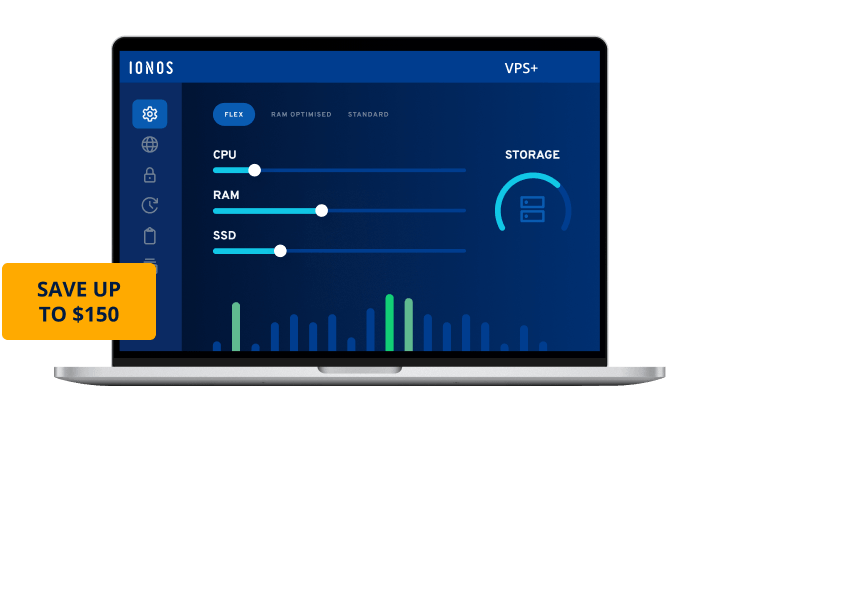

Get more power and maximum flexibility with the new VPS+
The latest from a host trusted by over 6.5 million customers worldwide.VPS hosting at an unbeatable price
NEW Now with even more performance for less!
State and local taxes will apply. Click here for our General Terms and Conditions.
Get more from your VPS, without paying more
VM cloning
Additional VMs
Load balancer
Private network
Block storage
Object storage

Dell enterprise hardware

99.99%+ uptime

Unlimited traffic

Active DDoS protection

Full root access

High-Speed Images

Customizable firewall

IPv4 & IPv6 dual stack

Instant provisioning
All VPS+ features at a glance
Data center locations | United States, United Kingdom, Germany, Spain
|
Availability | 99.99%
|
SSD NVMe storage system | |
Unlimited traffic | |
Bandwidth | External server connection up to 1 Gbps
|
24/7 expert support |
Wildcard SSL certificate | |
High-performance data centers | ISO 27001 certified
|
Firewall management | |
IPS/IDS | |
Cloud Backup (optional) | From $0.065/GB/month
|
DDoS protection |
Linux | Latest versions of AlmaLinux, Debian, Rocky Linux, and Ubuntu.
|
Windows | Windows Server® 2022 or 2025
|
KVM console | |
Cloud Panel | |
Full root access | |
Administration tool Plesk Obsidian | $6/month
|
Control panel | |
Encrypted remote access |
Number of email addresses | 2
|
2 GB storage per inbox | |
Email 2.0 | |
Anti-spam | |
Domains (optional) | From $1/year
|
1x IPv4 address per server included | |
Additional IPv4 addresses (optional) | $5/month per IPv4 address
|
1x IPv6/80 network included | |
Unlimited external domains | |
DNS management |
VM cloning | |
Load balancer | |
Private network | |
Additional VMs (add-on) | |
Block storage (add-on) | |
Object storage (add-on) |
The ideal environment for AI tools and workflows
Run n8n automations, open-source AI, and more — with additional VMs, load balancing, and monitoring built in.Whatever you're building, we've got you covered
Award-winning hosting you can trust

Powered by premium hardware partners


Grow on infrastructure engineered for reliability

Only at IONOS
Your personal consultant
Not only do you get the latest AI tech, but you also get your own personal consultant to guide you every step of the way.
24/7 expert support
Technical questions? Our award-winning experts are always available to help by phone, chat or email.
Virtual private servers — FAQs
Once your server is up and running, you can jump into your cloud panel and take charge:https://login.ionos.com/.
Quick-start guide: Discover easy-to-follow guides and practicaltips to streamline your setup and maximize your server’s potential:https://www.ionos.com/help/server-cloud-infrastructure/.
Comprehensive support every step of the way: Your server’s performance and yourpeace of mind are our top priorities. From hardware reliability to software essentials, we’rehere for you. Explore our Scope of Support for detailed information and assistanceoptions, including:
Self-service: Manage access, configure firewalls, and follow best practices for effectivebackups.
Expert premium assistance: For advanced needs like custom setups or complexconfigurations, our experts are here to help. You can find our contact details here.
Stay ahead with proactive data protection:
Backups: Ensure complete data security with our Cloud Backup solutions. Find step-by-stepsetup instructions in our Help Center.
Health monitoring: Regular HDD/SSD health checks are essential especially for dedicatedservers. Early detection helps prevent downtime and data loss.
Need assistance? Our team is ready to help: View contact details.
If you decide on one of our VPS+ hosting plans, you will have access to an operating environment that is tailored to support your application or software needs. You'll be able to install any apps yourself in no time, via root access. Typical use cases might be as:
- Web servers
- Email servers
- Shop servers
- Development servers
Customers can use the product for both non-commercial and commercial purposes.
When it comes to choosing an operating system for your web server, personal preference plays a key role. For those who value an intuitive user interface, Windows server operating system may be the ideal choice, thanks to its familiar design that makes setting up a server easy for beginners.
Alternatively, if cost is a concern, a virtual server plan with Linux could be a great option. This open-source operating system doesn't have licensing fees and is known for its security and small attack surface.
It's also a key part of the LAMP stack (Linux Apache, MySQL, PHP), which is the foundation for many web applications. So, if you're looking for an affordable, secure, and widely-used option for your web server, Linux may be the way to go.
Cloud servers and virtual servers both have virtualized infrastructures. The primary differences are in their architecture and range of functions. The majority of virtual servers are physical servers that house CPU, RAM, and storage.
Cloud infrastructures are usually comprised of compute and storage nodes. IONOS virtual servers use the same technological platform as the IONOS CLOUD, but they have a slightly reduced feature set.
A virtualized server combines physical hardware that is broken down into separate systems with the help of software. These servers can then be used and shared by several users. The resources available in the actual server (CPU, RAM, and memory) are divided.
Dedicated servers are servers that the customer receives as a whole. Comparable to a laptop or a home PC, the installed resources/components/hardware (CPU, RAM, memory, network access, etc.) are available for the exclusive use of one user.
Details of the scope of support can be found in the following Help Center article.
Setting up a server can usually be done within just a few minutes. Larger servers (with operating systems that take up a lot of memory) can lead to longer installation times.
Access to your server is available through the following means:
- Linux VPS+: via an SSH encrypted connection
- Windows VPS+: via RDP
Should any problems occur with the network or firewall, a KVM console is also available in the cloud panel to help ensure access.
Yes, once your server is ready, you will receive access to the central administration panel from (cloud panel), allowing you to manage the different Features and settings of your server with ease.
Your administrative rights include root access to your server, which gives you complete control over your systems, services, and network.
 Root servers
 SQL server hosting
 Game server hosting
 Webspace
 Server hosting
 AI email writer
 Business hosting
 Free Plesk license
 Free Domain Name
 Free VPS
 Servers
 Free cloud server
 Managed Kubernetes
 .info domain
 Free server hosting
 Cloud VPS
 Free SSL
 Free Website Hosting